
Returns accepted for 5 days
Free return shipping
No restocking fee
No final sale items
100% Payment Secure
Online Support
Returns accepted for 5 days
Free return shipping
No restocking fee
No final sale items
100% Payment Secure
100% Payment Secure


Key Benefits
- Work From Home
- Students & College
- Travel & Remote Work
- Gaming Setup
- Gifting
Mini Invisible Laptop Stand – Self-Adhesive Foldable Riser with Cooling & Ergonomic Lift (Pack of 2)
Mini Invisible Laptop Stand – Self-Adhesive Foldable Riser with Cooling & Ergonomic Lift (Pack of 2)
Couldn't load pickup availability


 Estimated Delivery Date :
19
-
21 September, 2026.
Estimated Delivery Date :
19
-
21 September, 2026.
Return rules summary
- Returns accepted for 5 days
- Free return shipping
- No restocking fee
- No final sale items
 Order on WhatsApp
The Stand That Sticks. The Upgrade That Lasts.
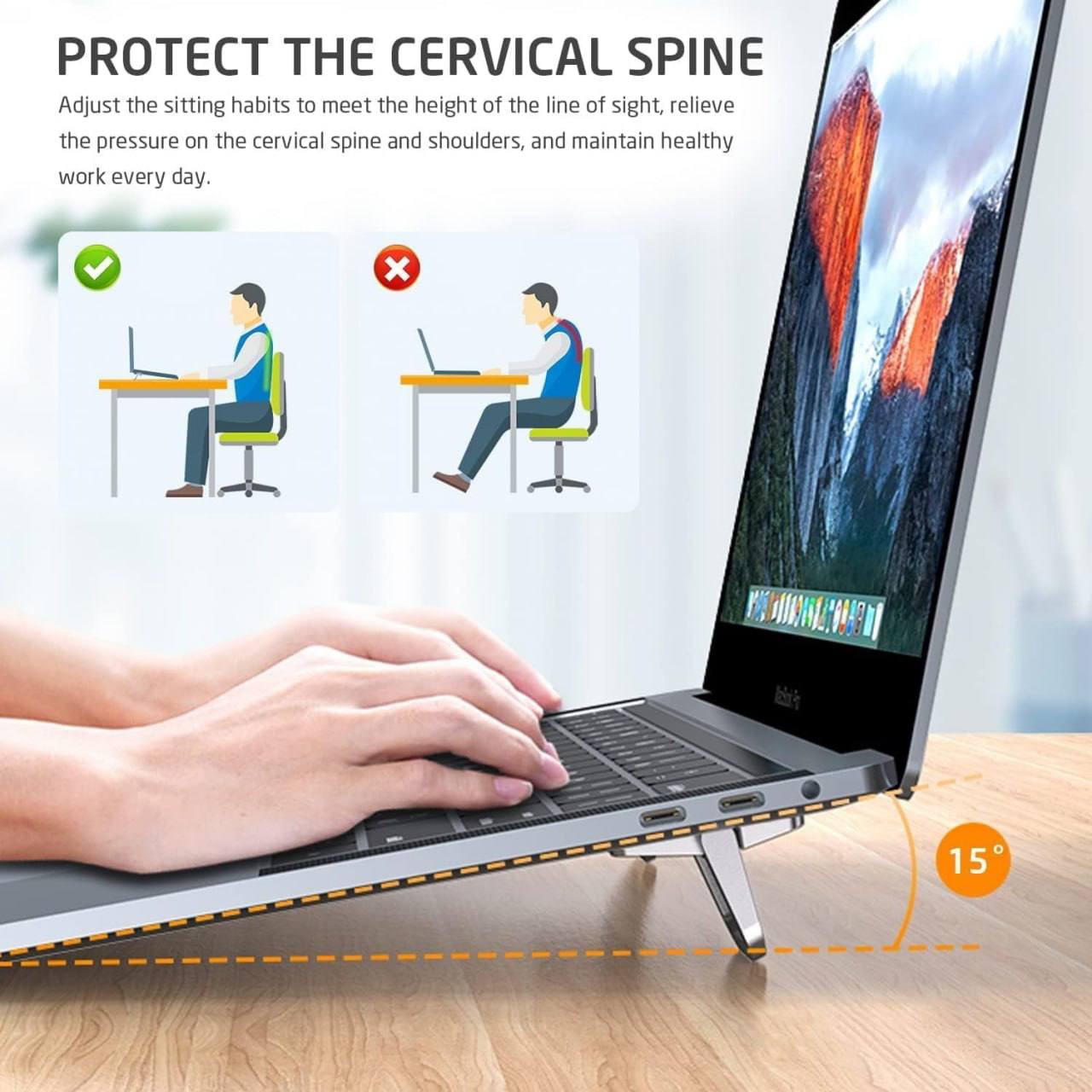
Your laptop deserves better than lying flat on a desk. This ingenious mini stand sticks directly to the bottom of your laptop, tablet, keyboard, or phone — and folds completely flat (just 7mm!) when not in use. When you need it, flip it open in one second for an instant 15° ergonomic lift that protects your posture, cools your device, and transforms how you work.
Crafted from premium zinc alloy with a soft silicone pad, it’s built to last and gentle on every surface. No bulk, no bag space wasted, no setup required — just stick it once and forget it’s there until you need it.
Why You’ll Love It
- Invisible Foldable Design: Folds down to just 7mm — virtually invisible when flat, instantly functional when flipped open.
- Self-Adhesive Installation: 3-step setup: peel, stick, press. No tools, no screws, no damage to your device.
- 15° Ergonomic Lift: Raises your screen to eye level, corrects posture, and relieves pressure on your cervical spine and shoulders.
- Fast Heat Dissipation: Elevates your device to allow air circulation underneath — drops CPU temps from 90°C to 50°C for smoother, lag-free performance.
- Premium Zinc Alloy Body: Lightweight yet incredibly strong — handles the weight of laptops, tablets, and keyboards with ease.
- Soft Silicone Pad: Non-slip base protects your desk surface and keeps your device firmly in place.
- Universal Compatibility: Works on laptops, MacBooks, tablets, keyboards, phones, and drawing tablets — any flat device.
How to Install
- Remove the protective cover from the adhesive pad
- Stick the stand onto the bottom of your laptop or device
- Gently press and hold for 10 seconds to secure
- Flip open to use — fold flat when done!
Specifications
- Material: Zinc Alloy + Silicone Pad
- Folded Thickness: 7mm
- Lift Angle: 15°
- Color: Silver
- Pack: 2 Pieces
- Compatible: Laptops, Tablets, Keyboards, Phones, Drawing Tablets
Perfect For
- Work-from-home desk setups
- Students & college use
- Travel & remote working
- Gaming & creative setups
- Gifting — a practical upgrade for any tech user
What’s in the Box
2 × Mini Invisible Laptop Stand (Silver)
2 × Self-Adhesive Pads
Small. Invisible. Transformative.
What you will get ?
What you will get ?


FAQs
How to buy a product?
- Browse or Search: Explore our wide range of products by navigating through categories or using the search bar to find specific items.
- Select the Product: Once you find the product you want, click on it to view more details, including descriptions, specifications, and customer reviews.
- Add to Cart: If you decide to buy, click the "Add to Cart" button. You can either continue shopping or proceed to checkout.
- Checkout: When ready, click on the shopping cart icon and select "Checkout." Fill in your shipping and payment details.
- Order Confirmation: After completing your payment, you'll receive an order confirmation via email with details of your purchase.
- Delivery: Sit back and relax! Your product will be delivered to your doorstep within the estimated delivery time.
How can i make refund from your website?
- Login to Your Account: Go to the My Account section by logging into your Mihikart account.
- Locate Your Order: Navigate to the "Order History" or "My Orders" tab and find the order for which you want a refund.
- Initiate Refund Request: Click on the order and select the "Request a Refund" or "Return" option. You'll need to provide a reason for the refund and any relevant details, such as product condition.
- Submit Refund Request: Once you fill in the required details, submit your refund request. You will receive a confirmation email.
- Approval and Return Process: Our team will review your request. If approved, you will be asked to return the product (if applicable) following the return instructions provided.
- Refund Processing: Once the product is received and inspected (if applicable), your refund will be processed, and the amount will be credited back to your original payment method within 5-7 business days.
I am a new user. How should I start?
1. Create an Account
- Visit the Mihikart homepage and click on the "Sign Up" button.
- Fill in your details such as your name, email address, and create a password. You can also sign up using your social media accounts.
2. Browse Products
- After signing up, you can start browsing through the wide range of products available.
- Use the search bar or category menus to find what you're looking for.
3. Add to Cart
- Once you find a product you like, click on it to view more details.
- If you wish to purchase, click the "Add to Cart" button.
4. Checkout
- When you’re ready to buy, go to your cart and proceed to checkout.
- Enter your shipping and payment details, and complete your purchase.
5. Track your Order
- After your order is confirmed, you can track it from your account under the "My Orders" section.
6. Get Help
- If you have any questions or need assistance, our customer support team is here to help!
Are my details secured?
Yes, your personal information and payment details are completely secure on Mihikart. We take data security very seriously and follow strict protocols to protect your information:
- Secure Encryption: All sensitive data, such as payment details and personal information, is encrypted using industry-standard SSL (Secure Socket Layer) technology to ensure safe transmission over the internet.
- Privacy Protection: We follow a strict privacy policy to ensure that your data is used only for purposes related to your transactions and order fulfillment. We do not share your details with any third parties without your consent.
- Secure Payment Gateways: Our payment gateways are fully PCI-DSS compliant, ensuring that your payment details are processed in a secure environment.
- Account Security: We recommend using a strong password and keeping your account credentials private. You can update your security settings anytime from the My Account section.
How do I make payment by my credit card?
1. Proceed to Checkout: After selecting the products you wish to buy, click on the shopping cart icon and choose "Checkout."
2. Enter Shipping Information: Fill in your delivery address and contact details, then proceed to the payment section.
3. Select Credit Card Payment: Choose the "Credit Card" option from the list of available payment methods.
4. Enter Card Details:
- Provide your credit card number, expiration date, and CVV (the 3-digit number on the back of your card).
- Ensure that the billing address matches the one associated with your credit card.
5. Review and Confirm: Double-check your payment details and order summary before clicking "Confirm Payment."
6. Secure Authorization: Depending on your bank, you may be required to complete an additional verification step, such as entering a one-time password (OTP) sent to your phone or email.
7. Payment Confirmation: Once your payment is successfully processed, you’ll receive an order confirmation via email with the details of your purchase.
Important Refund Notice
- Refunds will only be applicable if the product you receive is damaged upon delivery. To request a refund for a damaged product, you must provide an unboxing video as proof. The video should clearly show the condition of the package upon receipt and the damage to the product.
- Without an unboxing video, refund requests for damaged products may not be processed.
- If you have any questions or need assistance, please contact our customer support team.